Somewhere along the way, we stopped asking why.
A browser is a mature piece of software that has spent thirty years learning how to take input from a human being. It knows how to paste. It knows what backspace means. It knows how to talk to a screen reader, hand a value to a password manager, and refuse to submit a form that isn't filled in right. All of that is free, it works on every device, and it took an enormous amount of collective effort to get there.
And we keep throwing it away. Not for a reason — nobody sat down and weighed it. We throw it away because the component library had one, or because splitting a value into six pieces of state is how you'd naturally draw it in React, or just because it looked more finished in the mockup. Then we ship it, it looks right on the developer's laptop, and nobody ever finds out what it cost. That's the part that gets me: the consequences are real and they're all invisible from the machine where the code was written.
Here's a small one that shows the whole shape of the problem.
The example
I buy my green coffee from Sweet Maria's. I like Sweet Maria's — good beans, good people, been ordering from them for years. So take this as a bug report from a happy customer, not a dunk.
Signing in goes like this. They email me a six digit code, then ask me to type it into six separate boxes:
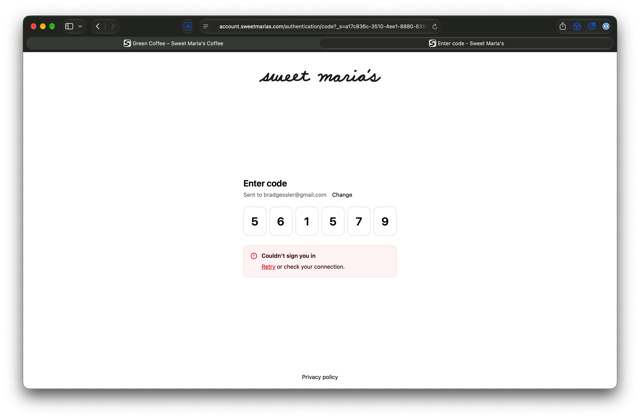
Six inputs for one value. And then it didn't work anyway.
What it costs
Every one of these is something the browser was already doing correctly, until somebody replaced it:
- Paste breaks. You copied all six digits. The browser puts them in the first box and stops. Fixing that means writing a
pastehandler that splits the string and distributes the characters — code that exists purely to undo the damage. - Backspace breaks. Deleting the digit you just typed should move you back a box. It doesn't, unless someone wrote a
keydownhandler for it. Same for arrow keys. Same for typing over a box that's already full. Most implementations get one of these right and the other two wrong. - Autofill breaks. Safari and Chrome will pull the code out of the incoming SMS or email and offer it as a one-tap fill — into a single field. Six fields get one digit and a shrug. So the fancy version is slower on a phone, which is the exact place typing hurts most.
- Password managers get confused. They're looking for a field to fill. They find six anonymous ones.
- Screen readers get worse. One labeled input announces once, with its label. Six unlabeled inputs announce six times and never say what you're entering. Somebody using a screen reader now has a strictly harder time buying coffee than they did before the redesign.
- The server pays too. You're reassembling
code1..code6instead of readingparams[:code].
Add it up and it's a few hundred lines of JavaScript, a support burden, and a pile of accessibility regressions — spent to make one textbox worse. Nobody set out to do that. But nobody asked, either.
The alternative isn't hard. It's one HTML5 field with constraints on it, and some CSS.
The field
<label for="code">Enter code</label>
<input
  id="code"
  name="code"
  type="text"
  inputmode="numeric"
  pattern="[0-9]{6}"
  maxlength="6"
  size="6"
  placeholder="______"
  autocomplete="one-time-code"
  title="Six digits from your email"
  required>
That's the whole control. No JavaScript. Each attribute is buying back something from the list above:
pattern="[0-9]{6}"andrequiredare the validation. The browser refuses to submit and shows its own message — andtitleis the text it puts in that bubble. This is constraint validation; it's been in every browser for over a decade.maxlength="6"stops at six characters, the job all that per-box focus juggling was doing.autocomplete="one-time-code"is the one people leave off. It's the signal that makes the SMS and email autofill work.inputmode="numeric"brings up the number pad without lying about the type. Skiptype="number"— a code isn't a quantity, and you'd inherit spinners, scroll-wheel edits, and a browser that happily accepts5e6.placeholder="______"is six underscores, which shows the shape of what you want. Cheap trick, works. Fair warning: a placeholder only shows while the field is empty, so it's a hint about length, not a running progress bar.
Can you control the width?
Yes, and the boring answer is the right one: size="6". It's one of the oldest
attributes on the web, it sets the field's width in characters, and it still
works everywhere.
I want to be honest about the version I tried first, because it's exactly the mistake this site exists to complain about. It looked like this:
/* Don't do this. */
input {
  letter-spacing: 0.5em;
  text-indent: 0.5em;
  width: calc(6ch + 3em);
  text-align: center;
}
Clever, and broken. box-sizing: border-box means that width is the border
box, so padding and borders eat into it and the last digit gets clipped off the
end. Centering text that carries a trailing letter-space puts the placeholder
and the typed value on different origins, so the underscores don't sit under the
digits. And ch is the width of a 0, which stops predicting anything the
moment you add spacing between characters.
Four declarations, three bugs, to do a job one HTML attribute already does.
What actually works is smaller:
input[name="code"] {
  font-family: ui-monospace, SFMono-Regular, Menlo, monospace;
  font-size: 1.9rem;
  text-align: left;
  padding: 0.45rem 0.65rem;
}
Monospace means every character is the same width, so ______ and 561579
occupy exactly the same space with no arithmetic. Left-aligned means the
placeholder and the value start at the same point. Padding gives it room without
anyone computing anything. The size attribute handles the width.
Here it is, live. Paste six digits into it:
Try submitting it with four digits. That error is the browser's, not mine.
Want the literal boxes? Keep going — a repeating-linear-gradient under the same
field draws six underlines, and :user-invalid turns it red only after
someone's actually had a go at it, instead of scolding an empty form:
input[name="code"]:user-invalid {
  color: crimson;
  border-color: crimson;
}
The actual point
Boxes aren't the enemy. The enemy is reaching for JavaScript before you've checked whether the browser already does it — because when you lose that bet, you don't just fail to gain anything. You take working behavior away from people who were relying on it, and you'll probably never hear about it, because the people most affected are the least likely to be in your bug tracker.
Six boxes are a paint job. Paint them onto a control that already works.
And Sweet Maria's, if you ever read this: that's the whole fix. Delete a few
hundred lines of JavaScript, ship one <input>, and I'll get back to buying
coffee a little faster.